
Driving Licence Apply Online | DL Download, Renewal & Status
Getting a driving licence used to mean standing in a queue outside your local RTO for half a day, filling out the same form twice because the first one got a coffee stain, and coming back next week because “the officer is on lunch.” That’s not how it works anymore.
Today, you can apply for a driving licence apply online through the government’s own digital system, track every stage from your phone, and only step inside an RTO office when it’s absolutely necessary — for your test. This guide walks you through the entire journey: applying for your first licence, checking your status, downloading your card, renewing it, and fixing the problems nobody warns you about.
Everything here is based on the official Parivahan Sewa portal process (parivahan.gov.in and its Sarathi module), so you’re not getting recycled blog advice — you’re getting the actual steps.
Which Licence Do You Actually Need?
Before you touch a form, figure out which service applies to you. This one decision saves you from filling out the wrong application entirely.
| Your situation | What you need |
|---|---|
| Never held any licence before | Learner’s Licence (LL) first |
| Have an LL for 30+ days, under 6 months old | Permanent Driving Licence (DL) |
| Lost or damaged your existing DL | Duplicate/reprint DL |
| Moved to a new address | Address change service |
| Name misspelled on your card | Name correction service |
| Planning to drive abroad | International Driving Permit (IDP) |
| DL expiring soon or already expired | Renewal |
If you’re brand new to driving, start with the Learner’s Licence. Everyone else can jump to the relevant section below.
Sarathi Login, Parivahan Login & Vahan Login
People get confused here constantly, so let’s clear it up in one line each.
- Parivahan login takes you to parivahan.gov.in, the umbrella portal for all road transport services in India.
- Sarathi login refers to the driving licence module — sarathi.parivahan.gov.in — where you apply, renew, download, and manage your DL.
- Vahan login is a separate system for vehicle registration, RC details, and challans, not licences.
For anything related to your driving licence, you want Sarathi. Bookmark it now, because you’ll come back to it for renewal, address updates, and downloads later.
Documents You Need Before You Start
Keep these scanned and ready. Uploading blurry photos is the #1 reason applications get stuck.
- Proof of identity: Aadhaar card, PAN card, passport, or voter ID
- Proof of address: Aadhaar card, utility bill, rent agreement, or passport
- Proof of age: Birth certificate, 10th marksheet, or passport
- Passport-size photograph
- Medical certificate (Form 1A) — only if you’re above 40 or applying for a transport vehicle licence
- Your Learner’s Licence number, if you’re applying for the permanent DL
Driving Licence Eligibility
Driving licence eligibility depends entirely on the vehicle class:
- 16 years old: non-geared two-wheelers (up to 50cc), with a parent or guardian’s consent
- 18 years old: cars, geared two-wheelers, and most private vehicles
- 20 years old: certain transport and commercial vehicle categories
You also need basic knowledge of road signs and traffic rules for the written test, and reasonable physical fitness to handle a vehicle safely.
How to Apply for a Learner’s Licence Online
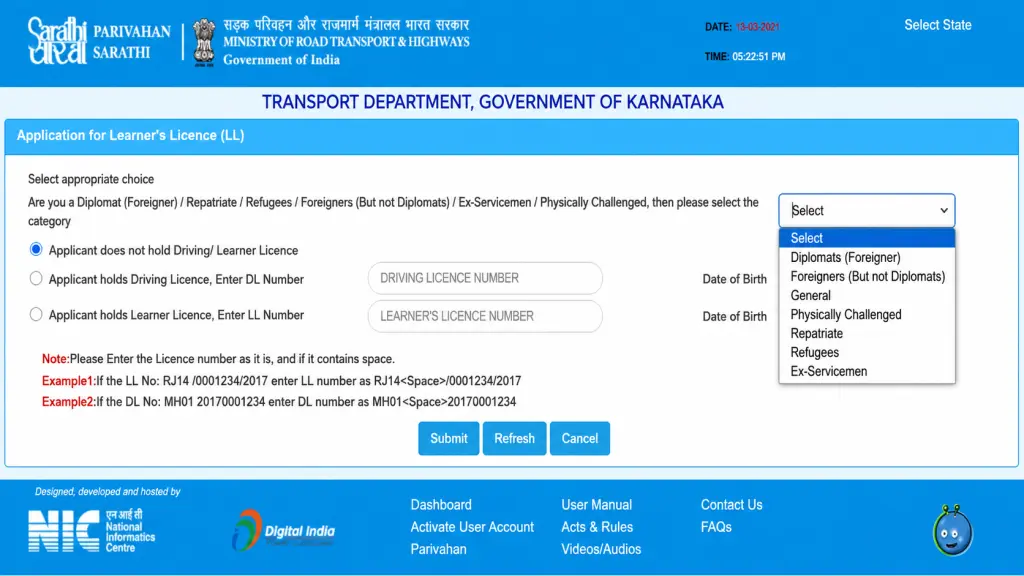
This is where everyone starts. Here’s the exact process on the Parivahan Sewa portal:
- Go to sarathi.parivahan.gov.in and select your state.
- Click “Apply for Learner Licence.”
- Enter your Aadhaar number for instant verification, or choose the non-Aadhaar route if you prefer.
- Fill in your personal details and pick the vehicle class you want to drive.
- Upload your identity, address, and age proof documents.
- Take the learner’s test online right from your laptop (available in most states now) or book a slot at your local RTO.
- Pay the fee through UPI, debit card, or net banking.
- Download and print your acknowledgment slip.
Pass the test, and your Learner’s Licence is issued instantly in most cases. It stays valid for six months, and you can’t drive alone with it — a licensed driver must be with you the whole time.
Driving Licence Apply Online
Once your Learner’s Licence is at least 30 days old (and not more than six months old), you’re ready for the real thing. Here’s how the Apply for Driving Licence Online process works step by step:
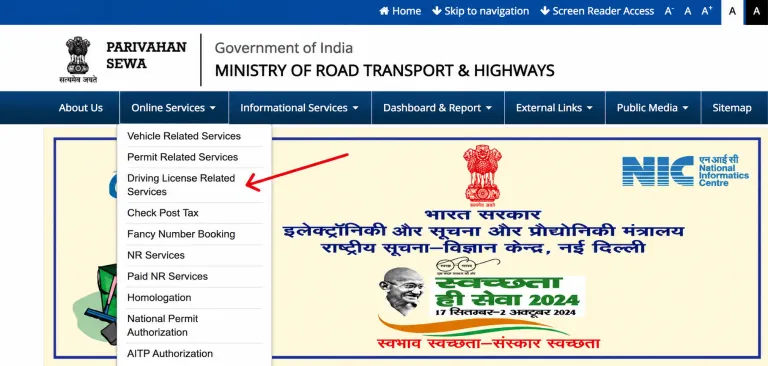
- Visit sarathi.parivahan.gov.in and select “Apply for Driving Licence.”
- Enter your Learner’s Licence number and date of birth to pull up your existing record.
- Confirm your personal details and address; update anything that’s changed.
- Upload your photo and signature if your state asks for it.
- Book a slot for your driving test at your chosen RTO.
- Pay the application fee online.
- Print your acknowledgment and keep your original documents ready for test day.
This is the full online driving licence application flow, and it works the same whether you’re applying in Mumbai, Lucknow, or a small town RTO — the portal is national, even though offices are local.
What Happens During the Driving Test
You’ll need to physically show up for this part. Expect:
- A figure-8 or H-shaped track test for two-wheelers
- Parallel parking, gear control, and mirror checks for cars
- A short road test in some states
Carry your original documents, your Learner’s Licence, the acknowledgment slip, and a vehicle with valid registration, insurance, and pollution certificate. If you don’t pass, you can retake it after paying the fee again, usually with a 24-hour gap required before your next attempt.
Driving Licence Fees You Should Expect
Fees vary slightly by state, but here’s a general range to budget for:
| Service | Approximate fee |
|---|---|
| Learner’s Licence test | ₹150 |
| Licence issuance | ₹50 |
| Permanent DL application | ₹200–300 |
| Renewal | ₹200–400 |
| Duplicate/reprint | ₹200–300 |
| International Driving Permit | ₹1,000 |
Always confirm exact numbers on the portal for your state before paying — they do get revised.
How to Check Driving Licence Application Status Online
Once you’ve submitted your form, don’t just wait around wondering. Here’s the driving licence status check process:
- Go to sarathi.parivahan.gov.in and select “Application Status.”
- Enter your application number and date of birth.
- Hit submit to see exactly where your file sits — application received, under verification, test scheduled, or dispatched.
This same method works for driving licence application status, driving licence tracking, and general online dl status checks. If you’d rather use your phone, the mParivahan app shows the same information under its tracking tab, which makes driving licence application tracking even simpler while you’re out and about.
How to Download Driving Licence Online
Your physical smart card can take up to 30 days to arrive by post, but you don’t have to wait for it to prove you’re licensed. Here’s how driving licence download actually works:
- Log in to the mParivahan app or DigiLocker.
- Search for your DL using your licence number and date of birth.
- Your digital driving licence appears instantly and can be saved as a PDF.
This gives you an e driving licence that’s legally valid across India under the Motor Vehicles (Amendment) Act, 2019 — traffic police accept it exactly like the physical card. So if you were looking for how to download driving licence without visiting an RTO, this is it. The same steps work for learner licence download and driving licence pdf download.
Driving Licence Card Download and Print
If you specifically want a hard copy before your smart card arrives, you can also do a driving licence print or driving license print straight from the acknowledgment or the DigiLocker PDF. It won’t replace your official card, but it’s useful for verification purposes in the meantime. Many people search for driving licence card download expecting a physical-card replica — what you actually get is the verified digital version, which serves the same legal purpose.
How to Verify a Driving Licence Online
Whether you’re an employer checking a new driver or just confirming your own record is correct, here’s how to verify driving licence online:
- Visit the Sarathi portal and select “DL Verification” or “Check Driving Licence Details.”
- Enter the licence number and date of birth of the holder.
- The system pulls up the name, issue date, validity, and vehicle classes authorized.
This same process covers driving licence verification, driving license verification, and general check driving licence details searches. It’s a quick way to confirm a licence is genuine before you rely on it for anything official.
Driving Licence Number Search
Lost track of your own licence number? A driving licence number search through the “Know Your DL” tool on Sarathi lets you retrieve it using your name, date of birth, and registered mobile number. It takes a couple of minutes and saves you a call to the RTO.
Driving Licence Renewal Online
Your permanent DL doesn’t last forever, and letting it lapse creates unnecessary hassle. Here’s the driving licence renewal online process, also called Driving License Renewal Online:
- Go to Sarathi and select “Renewal of Driving Licence.”
- Enter your existing DL number and date of birth.
- Upload a recent photo, address proof, and a medical certificate (Form 1A) if you’re over 40.
- Pay the renewal fee.
- Visit the RTO only if physical verification is requested — otherwise, everything happens online.
You get a 30-day grace period after expiry without penalty, and you can actually renew up to one year before or after your expiry date. If your licence has lapsed for more than five years, though, you’ll need to apply fresh instead of renewing.
Driving Licence Address Change Online
Moved cities? You don’t need a new licence, just an update. The driving licence address change process:
- Log in to Sarathi and select “Change of Address.”
- Enter your DL number and date of birth to pull up your record.
- Upload your new address proof.
- Pay the processing fee and submit.
Your updated address reflects on your digital licence almost immediately, though the physical card may take a few weeks to reissue if you request one.
Driving Licence Name Correction Online
Spelling errors on official documents cause more trouble than people expect. For a driving licence name correction, or driving licence correction online in general:
- Select “Correction in Driving Licence” under Services on DL.
- Submit the correct spelling along with a supporting ID proof (Aadhaar or passport) showing the accurate name.
- Pay the correction fee and wait for RTO approval.
Keep in mind this is one of the few services where physical document verification is more likely to be required.
Driving Licence Duplicate, Reprint, and Replacement Online
If your card is lost, stolen, or damaged, don’t panic — this is a routine fix. For driving licence replacement online or a straightforward driving licence reprint:
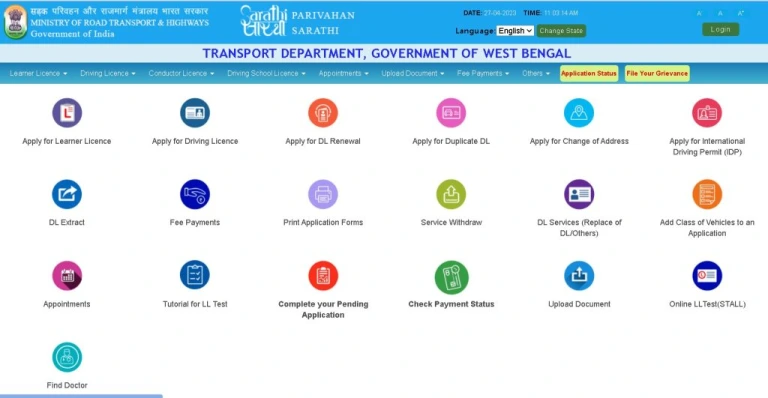
- File a police complaint or FIR if the licence was stolen (not always mandatory, but recommended).
- Go to Sarathi and select “Duplicate Driving Licence.”
- Upload your ID proof and, if applicable, the FIR copy.
- Pay the duplicate fee.
- Your new card is dispatched to your registered address.
Your existing digital DL on mParivahan remains valid the entire time you’re waiting, so you’re not left without proof of licence.
Driving Licence Appointment and Slot Booking
For services that need an in-person visit — like your driving test — you’ll book a driving licence appointment through the same portal. Look for driving licence slot booking or driving licence test appointment under your applied service, pick an available date and time at your preferred RTO, and you’re done. Arriving without a booked slot usually means getting turned away, so don’t skip this step.
International Driving Permit Apply Online
Planning to drive overseas? The international driving permit apply online process requires you to already hold a valid permanent DL. Apply through Sarathi under “International Driving Permit,” upload your passport, visa, and travel ticket copies, pay the fee, and collect your IDP from the RTO — this one usually needs an in-person pickup. It’s valid for one year and must be reissued for longer trips.
New Driving Licence Apply Online
If you’re a first-time applicant in 2026, a few updates work in your favor for new driving licence apply online applications:
- One Nation One License lets you apply at any RTO, not just the one near your permanent address, as long as your address proof matches the jurisdiction you’re applying under.
- Faceless services mean many states let you complete your learner’s test entirely from home.
- Sarathi 4.0 links all RTOs into a single database, so your records follow you even if you move states.
- Aadhaar-based verification speeds up identity checks dramatically compared to manual document review.
Common Problems People Run Into
- Payment deducted but application not updated: Wait 24 hours for the payment to sync; if it doesn’t reflect, use the “Check Payment Status” option on Sarathi before contacting support.
- Application stuck at “RTO Level” processing: This usually means manual verification is pending. Contact your RTO directly with your application number.
- Haven’t received your DL after two months: Visit your RTO in person with your acknowledgment slip to check the dispatch status.
- Document upload rejected: Check the file size and format requirements (usually JPEG or PDF under 200KB) before re-uploading.
- Aadhaar details don’t match your other documents: Get your Aadhaar corrected first; mismatches are one of the most common causes of application delays.
More Things People Search For
A lot of specific searches around this topic lead back to the same handful of answers, so here they are in one place:
- Driving licence age limit: 16 for non-geared two-wheelers with parental consent, 18 for cars and geared vehicles.
- Driving licence documents required: Aadhaar or PAN for identity, a utility bill or Aadhaar for address, and a birth certificate or 10th marksheet for age.
- How to apply driving licence online: through sarathi.parivahan.gov.in, following the Learner’s Licence and Permanent DL steps covered earlier in this guide.
- Learner licence apply online and learner driving licence apply online both describe the same LL application process outlined above.
- Learner licence test online is available as a home-based test in most states under the Faceless LL initiative.
- Driving licence status and driving license status (the American spelling of the same term) work identically — check either through the Application Status option on Sarathi.
- Sarathi parivahan driving licence and parivahan driving licence both refer to the same Sarathi-hosted service described throughout this article.
- Driving licence login and driving license login simply mean signing into the Sarathi portal with your registered mobile number or Aadhaar.
- DL application online and driving licence update online cover any service — renewal, address change, or correction — completed digitally instead of at an RTO counter.
- Driving licence portal: sarathi.parivahan.gov.in, run under parivahan gov in (parivahan.gov.in).
- Driving license online registration refers to your very first Learner’s Licence signup on the portal.
- Online dl download and mparivahan driving licence download both point to pulling your digital DL from the mParivahan app or DigiLocker.
- Driving License Download is the same process described in the download section above, just written with the American spelling.
- Apply Driving License Online and Driving License Apply Online describe the exact permanent DL process covered earlier in this guide.
Frequently Asked Questions
Is a driving licence issued in one state valid across India?
Yes. Once issued, your DL is valid nationwide, regardless of which RTO issued it.
Can I apply for a driving licence without an Aadhaar card?
Yes, though the process takes slightly longer since you’ll need alternate proof and manual verification.
How long does it take to get a permanent DL after passing the test?
The physical card typically arrives within 30 days, but your digital licence is valid immediately after approval.
What if I fail my driving test?
You can retake it after paying the test fee again, usually after a 24-hour waiting period.
Can I apply for my DL in a different state than where I got my Learner’s Licence?
Generally, your permanent DL must be issued from the same state as your LL, though address-based exceptions exist under the newer policy updates.
Is the digital driving licence on mParivahan legally valid?
Yes, it carries the same legal weight as your ph55666666ysical card under current motor vehicle law.
What’s the penalty for driving without a valid licence?
Fines can go up to ₹5,000, along with possible imprisonment for repeat offenses.
Final Word
Applying for your driving licence online doesn’t have to feel like navigating a maze. Know which service you need, keep your documents ready, and use the Sarathi portal directly instead of third-party apps that just repackage the same government process. Whether you’re starting from scratch with a Learner’s Licence, tracking your driving licence status, or handling a renewal years down the line, every step described here happens on the same official system — no shortcuts, no confusion.
This is an independent guide and not affiliated with the Government of India. Always complete your actual application on the official Parivahan Sewa portal at parivahan.gov.in.